
Επανενεργοποίηση του Instagram

How do I fix my invalid source?

  1. Reconnect your account to the plugin by navigating to your WordPress dashboard > Instagram Feed > Settings > remove the connected account(s) by clicking the red trash icon, then click the Save Settings button. 
  2. Click the Add Source button, select your Account Type, and click the blue Login with Instagram or Facebook button.

    Note: If you selected a Business Account Type when sent to Facebook, you might need to click the Edit Settings button to review your connection settings and ensure all pages, profiles, and permissions are selected.
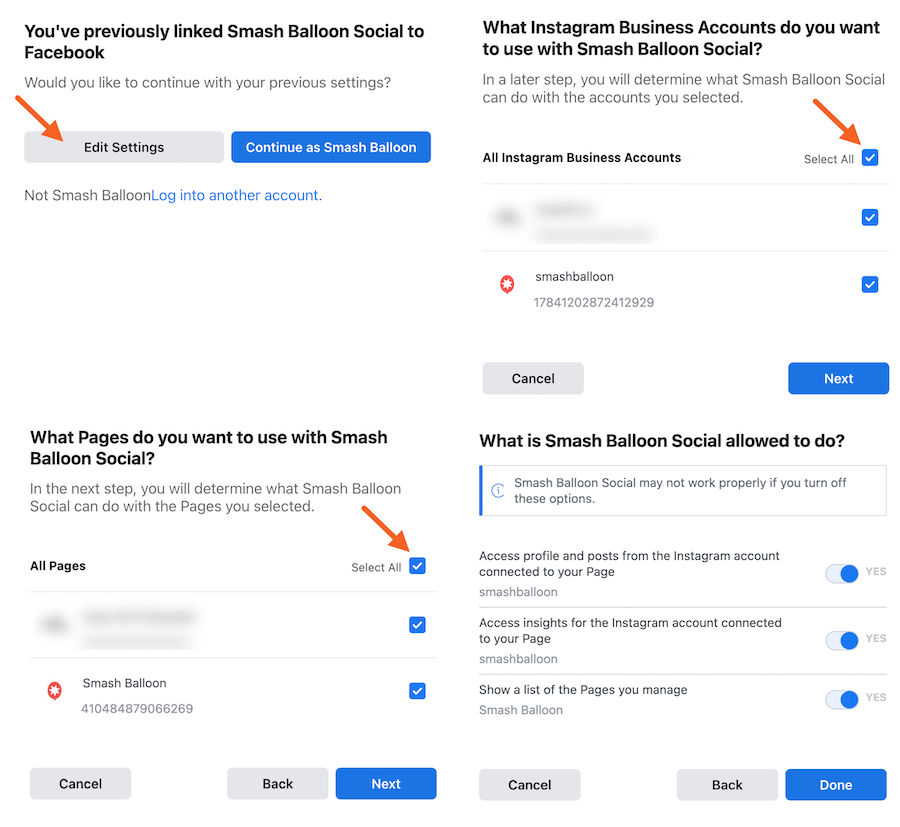
  3. Once your account has been re-added, click the Save Changes button.

Σχετικά άρθρα

Πως εκδίδω τιμολόγια από Google Ads

Βήματα έκδοσης τιμολογίων – Google Ads – Βήμα 1ο Συνδέομαι στο Google Ads λογαριασμό της επιχείρησής μου. Κάνω κλικ στο

ΠΕΡΙΣΣΟΤΕΡΑ

Πως εισάγω nameservers στο domain μου (SR2-120)

Οι nameserver μας είναι: ns269.grserver.grns270.grserver.gr Για να εισάγετε τους nameservers του hosting πακέτου σας στο domain name σας, στο Papaki,

ΠΕΡΙΣΣΟΤΕΡΑ

Πως προσθέτω μεταβλητά προϊόντα στο e-shop

Πηγαίνοντας το ποντίκι πάνω στο μενού Προϊόντα στα αριστερά και έπειτα στο υπομενού Προσθήκη Νέου θα δείτε τη σελίδα εισαγωγής

ΠΕΡΙΣΣΟΤΕΡΑ
Start typing to see posts you are looking for.