
Επανενεργοποίηση του Instagram

How do I fix my invalid source?

  1. Reconnect your account to the plugin by navigating to your WordPress dashboard > Instagram Feed > Settings > remove the connected account(s) by clicking the red trash icon, then click the Save Settings button. 
  2. Click the Add Source button, select your Account Type, and click the blue Login with Instagram or Facebook button.

    Note: If you selected a Business Account Type when sent to Facebook, you might need to click the Edit Settings button to review your connection settings and ensure all pages, profiles, and permissions are selected.
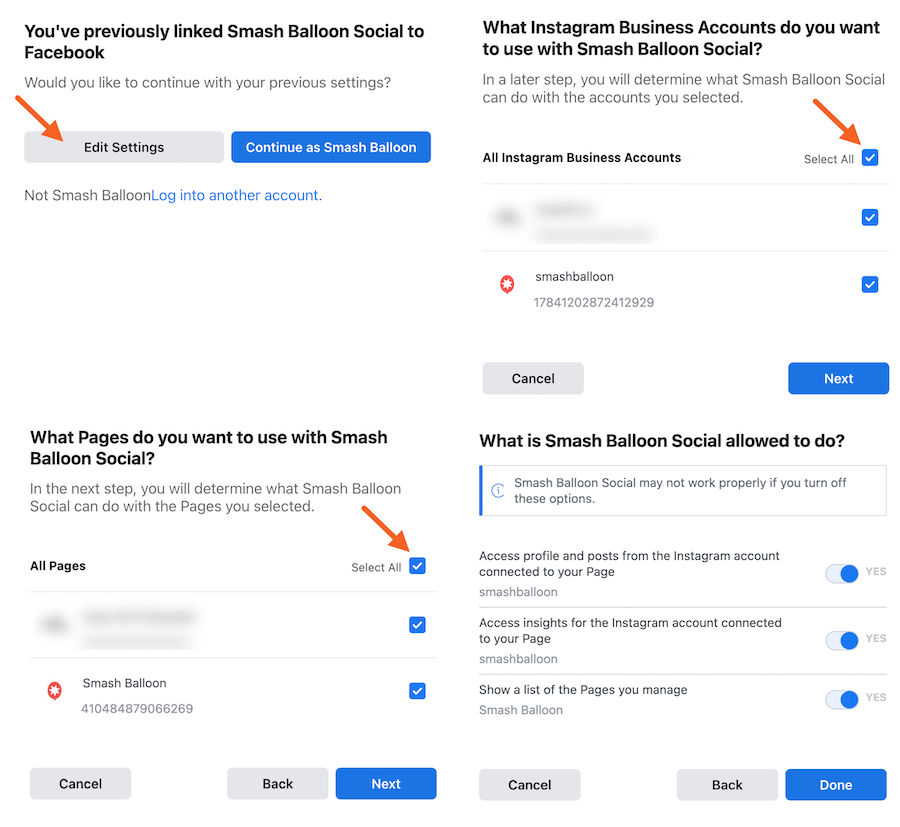
  3. Once your account has been re-added, click the Save Changes button.

Σχετικά άρθρα

Πως δημιουργώ λογαριασμό στο Google Ads

Δημιουργία Λογαριασμού Google Ads H δημιουργία του λογαριασμού Google Ads για την επιχείρησή σας, είναι προτιμότερο να γίνει από εσάς,

ΠΕΡΙΣΣΟΤΕΡΑ

Πως προσθέτω υπογραφή email (Gmail)

Προσθήκη υπογραφής στο Gmail Η υπογραφή ηλ. ταχυδρομείου είναι κάποιο κείμενο, όπως τα στοιχεία επικοινωνίας σας ή κάποιο αγαπημένο σας

ΠΕΡΙΣΣΟΤΕΡΑ

Πως κάνω SEO στην Ιστοσελίδα μου

Όλες οι Ιστοσελίδες που δημιουργούμε έχουν ήδη έτοιμο το βασικό SEO που χρειάζεται για να ανέβει στις αναζητήσεις, ανάλογα με

ΠΕΡΙΣΣΟΤΕΡΑ
Start typing to see posts you are looking for.